




Acuity Scheduling · Squarespace Scheduling · WhatsApp
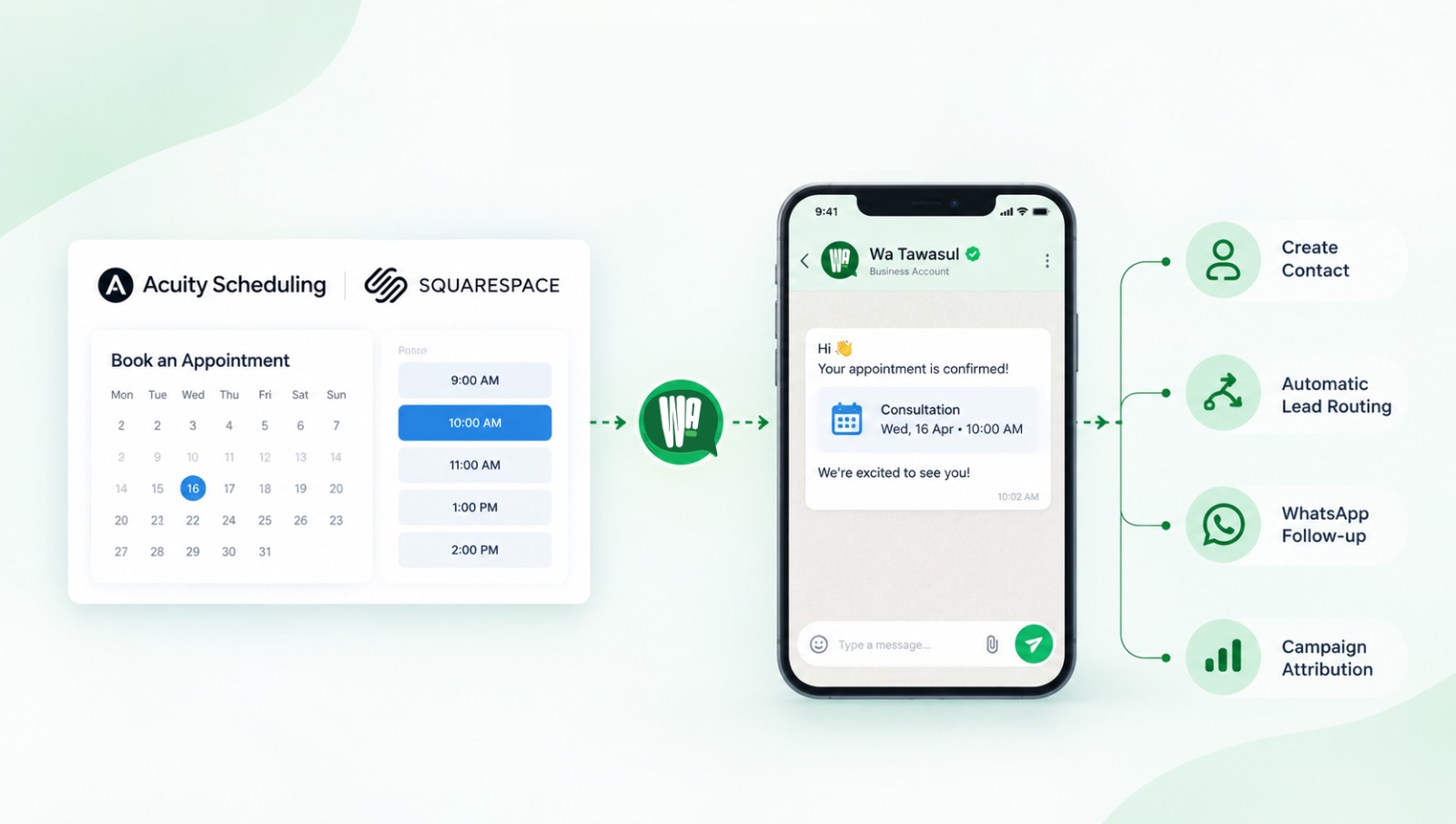
Connect Acuity Scheduling or Squarespace Scheduling to WhatsApp in minutes. Wa Tawasul sends the welcome message, assigns the right team member, tracks which ad brought each booking and shows it all on one dashboard.

The booking is not the finish line
A new booking lands in your calendar. Someone clicked an ad, picked a time, filled in a form, and moved on with their day.
Now the real work starts, and in most businesses it happens by hand:
- Someone has to notice the booking.
- Someone has to copy the phone number into WhatsApp and write "Hi, thanks for booking."
- Someone has to decide which branch or team member owns this client.
- Someone has to remember to follow up if the client never answers.
- And at the end of the month, someone has to work out which ads actually brought clients in.
Every one of those steps is a place where leads leak. A message sent six hours late. A client assigned to the wrong branch. A "no reply" that nobody chased. An ad budget spent without knowing what it produced.
If you run your business on Acuity Scheduling (now Squarespace Scheduling), Wa Tawasul closes that gap. It takes the booking the moment it happens and does the follow-up work for you, on the channel your clients already answer: WhatsApp.
What Wa Tawasul does with every Acuity booking
1. It connects in minutes, without code
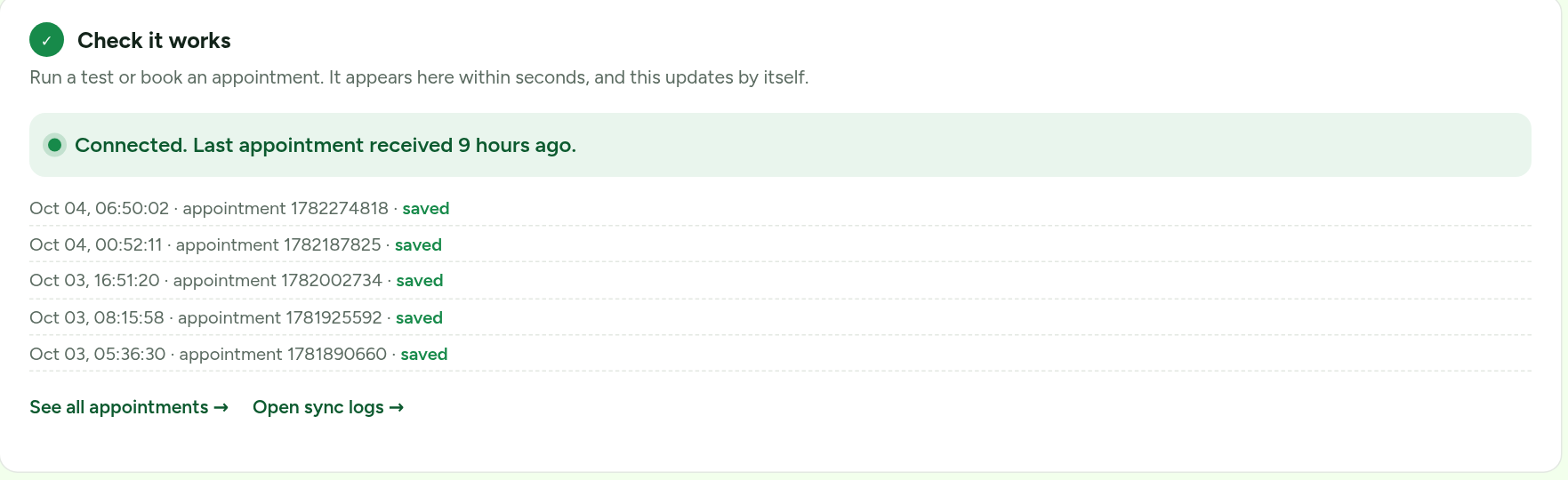
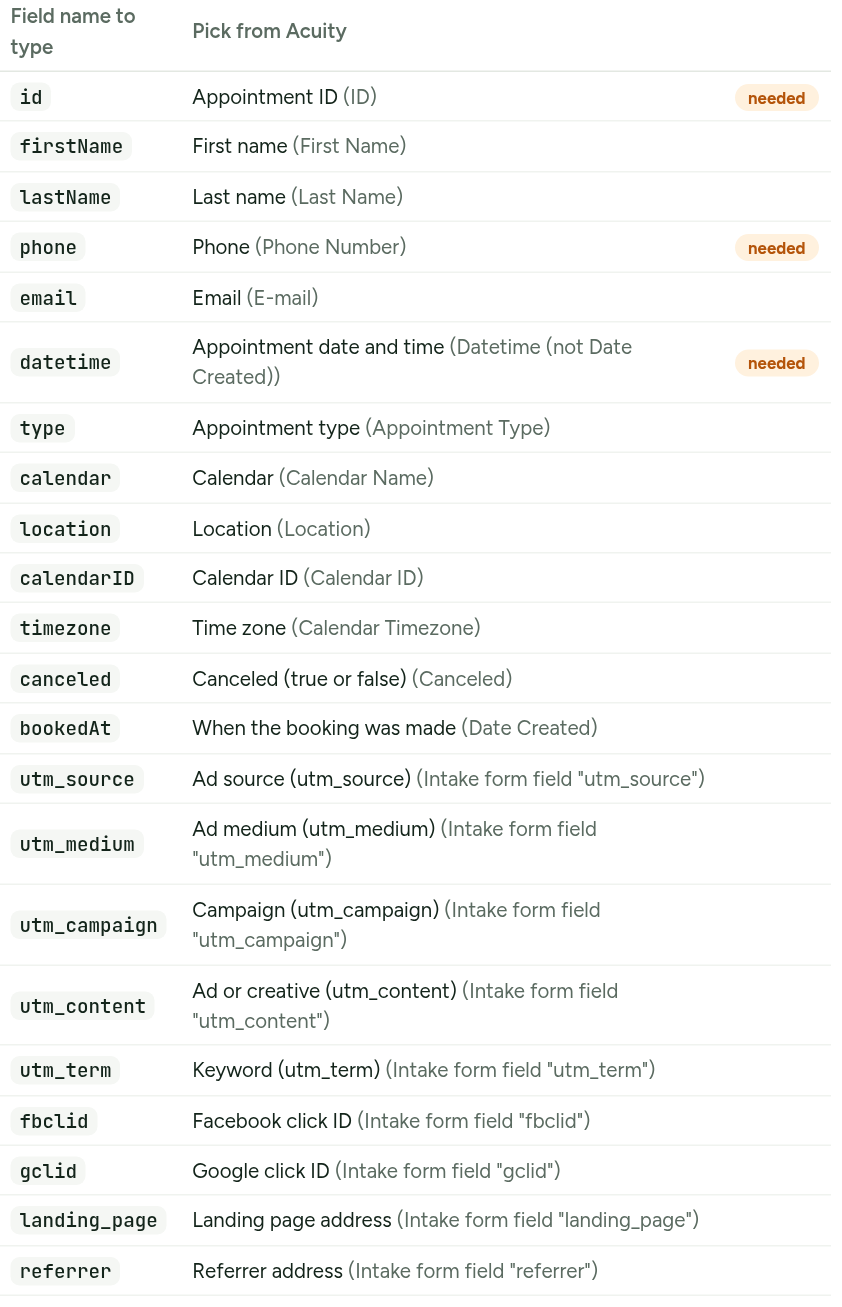
You connect Acuity through a private link and a short Zapier setup, or directly if your plan allows it. A guided Setup page shows exactly which fields to send and checks that a test booking arrives. There is nothing to install and no developer needed.

2. Every booking becomes a contact, instantly
Name, phone, email, service, appointment time and place are saved as a WhatsApp contact the second the booking arrives. Spreadsheet quirks, like the stray apostrophe that ruins phone numbers in CSV exports, are cleaned automatically. If the client has booked before, Wa Tawasul recognises them instead of creating a duplicate.
3. Lead rules route each client to the right place
You decide the logic once. For example:
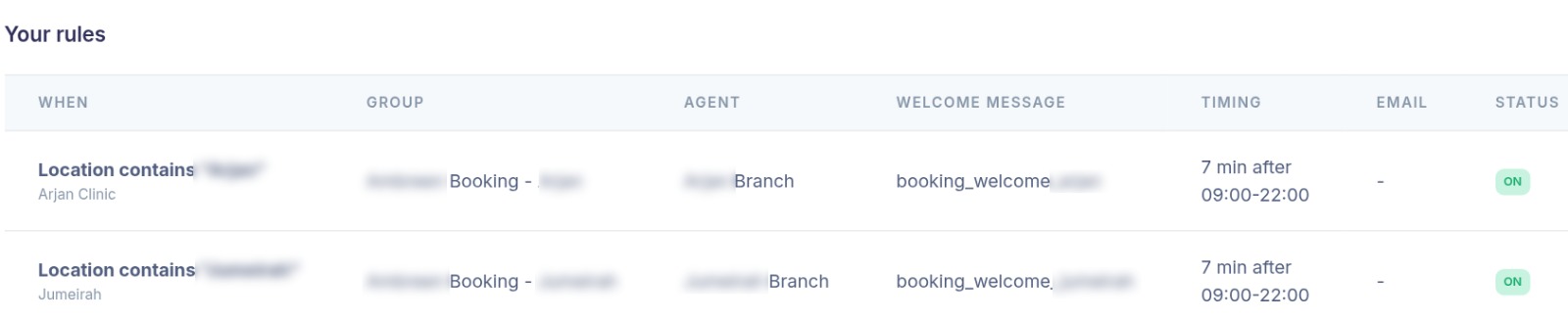
- If the location contains "Arjan", add the client to the Arjan group, assign the Arjan team member, and email the Arjan front desk.
- If the service is "Botox", assign the aesthetics team.
- Everything else goes to the default rule.
Rules can combine up to two conditions (location, calendar, service, booking status, WhatsApp keyword, lead source). The first matching rule runs, and a default rule catches the rest. Multi-branch clinics, salons, studios and consultancies can run every location from one account, each with its own group, agent and message.
4. A welcome message goes out automatically, at the right time
This is where the hours are saved. Each rule can send an approved WhatsApp template with the client's name, service, date, time and place filled in. You control:
- Delay: send straight away, or a few minutes later so it feels natural.
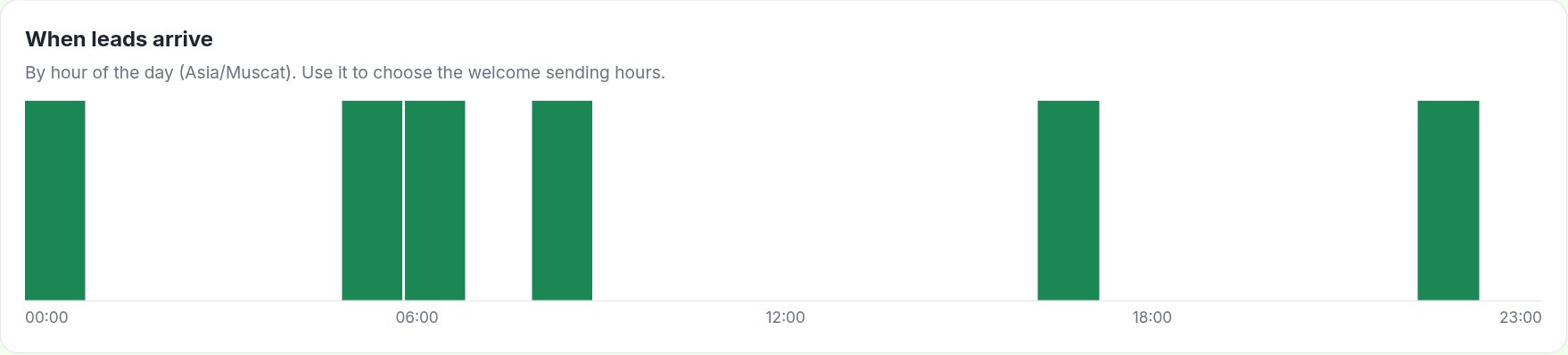
- Sending hours: a booking made at 2 a.m. gets its welcome at 9 a.m., not in the middle of the night.
- Consent: your booking form's consent message can count as opt-in, and clients who have opted out are never messaged.
Nobody types anything. The client gets a clear, branded confirmation on WhatsApp, where they are most likely to read it.
5. You can see what happened to the message
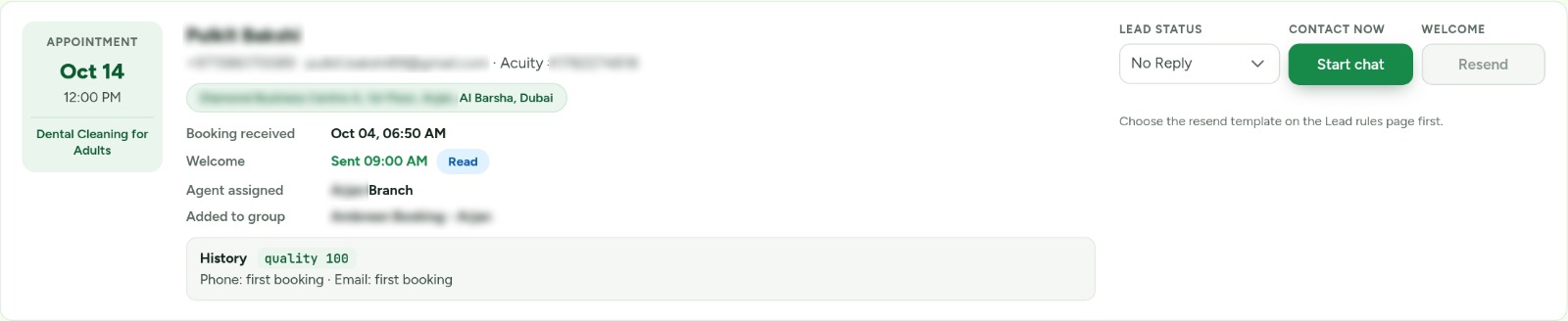
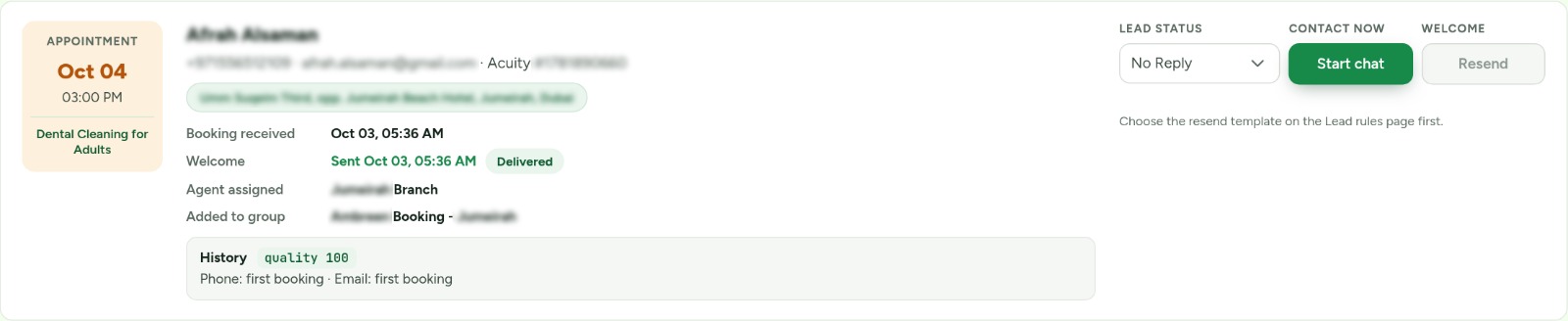
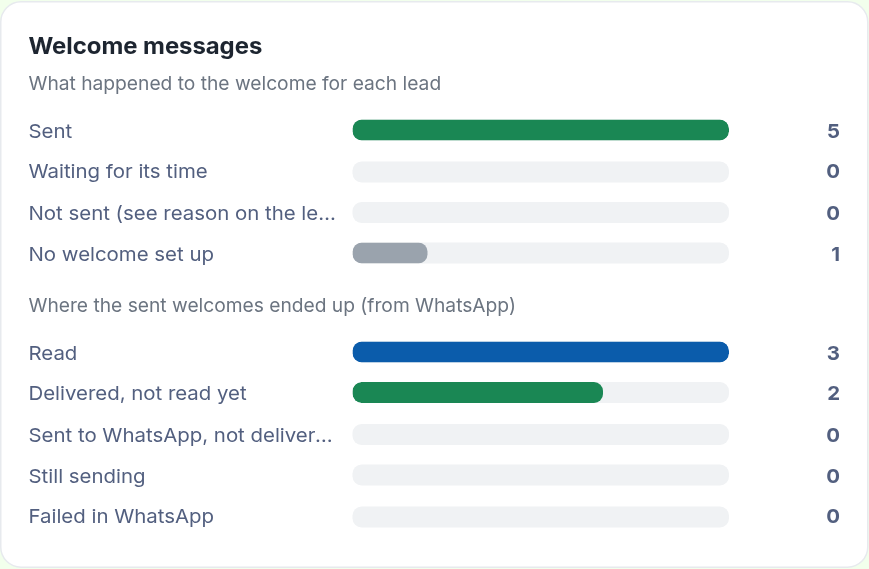
On every lead card you see whether the welcome was sent, delivered or read, and why, if it failed. No more guessing whether "we messaged them" is true.
6. A gentle nudge for clients who go quiet
If a client has not replied, your team can resend one approved follow-up template: first after four hours, and once more a day later. It stops the moment the client replies, never goes to someone who opted out, and never sends more than twice. It is a nudge, not a spam cannon, and every send is logged with who pressed it and when.
7. Leads that never touched Acuity are captured too
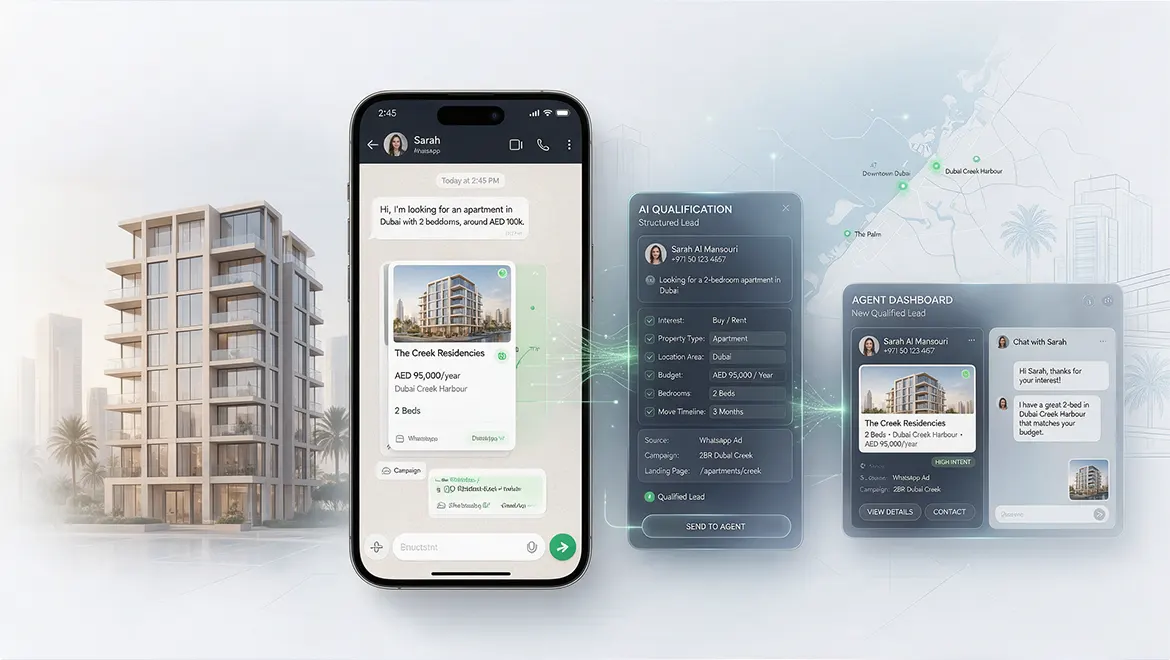
Not every enquiry books online. Many tap a "Message us on WhatsApp" button on an ad or a landing page. Wa Tawasul recognises a keyword or reference in that first message (for example, "BOTOX-LP") and records the person as a lead, runs the same rules, and keeps the source. Your Acuity bookings and your WhatsApp enquiries finally live in one list. (Full walkthrough below.)
8. A booking history and quality score on every lead
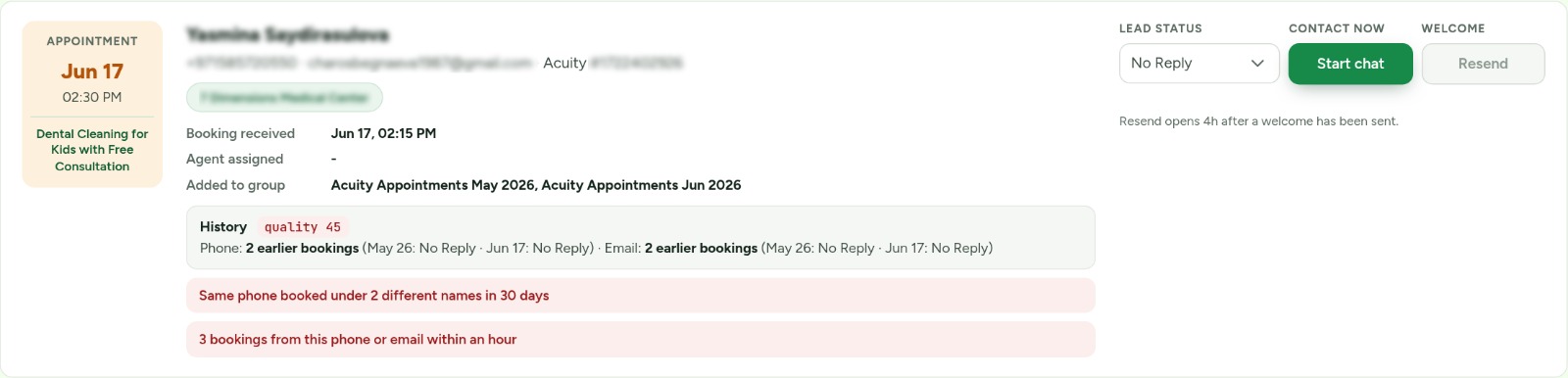
Each card checks the phone number and email against all earlier bookings and shows the result separately: "2 earlier bookings (Aug 12: No show, Sep 2: Booked), email: first booking." A 0 to 100 quality score flags the patterns that waste your time: the same phone under different names, throwaway email addresses, a burst of bookings within an hour, or clients who booked before and never replied. It only informs. Nothing is blocked or deleted without you.
From a landing page tap on WhatsApp to a booked client, in the same place
Not everyone books through a form. On mobile especially, the fastest path is a button: "Chat with us on WhatsApp." The visitor taps, WhatsApp opens with a message already typed, and they hit send. It is the highest-intent moment you will get, and in most businesses it vanishes into a personal phone with no record of where it came from.
With Wa Tawasul, that tap becomes a tracked lead in the same Acuity module and the same list as your calendar bookings. You do not need a second tool, a second inbox or a spreadsheet.
How it works, step by step
- Create your link. Use the free WhatsApp Go tool to build a
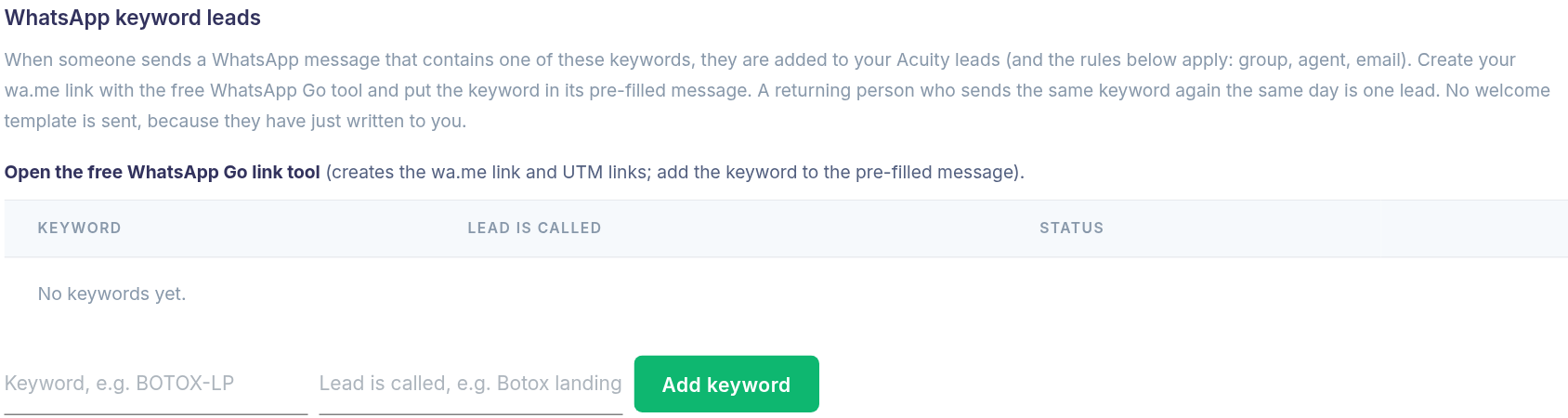
wa.melink for your WhatsApp number. Put a short, unique keyword in the pre-filled message, one per landing page or ad (for exampleBOTOX-LP,DENTAL-IG). The same tool builds the UTM links for your ads. - Register the keyword. In Lead rules, add the keyword and the name the lead should carry ("Botox landing page"). That is the whole setup.
- Put the button on your page. Anyone who taps it and sends the message is recognised the moment it arrives. A returning person who sends the same keyword again the same day counts as one lead, so your numbers stay honest.
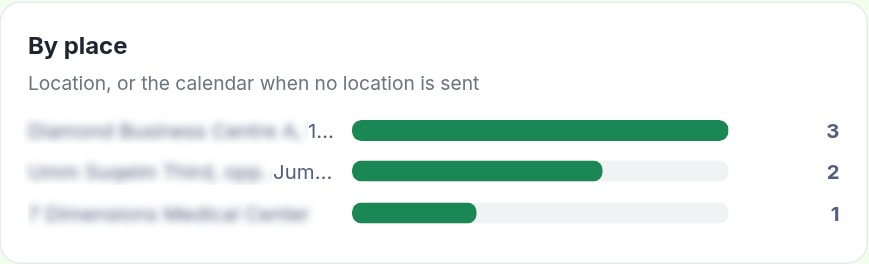
- Your lead rules apply automatically. The same rules that handle Acuity bookings add the lead to the right group, assign the right agent and email your team. A lead tapping a Jumeirah ad can land with the Jumeirah team without anyone sorting it.
- No automatic welcome template. This is on purpose. The person has just written to you, so the conversation is already open. Your agent (or your WhatsApp flow) replies in the chat, instead of a template arriving on top of a message they sent seconds ago.
Nurture the lead through the funnel
A WhatsApp lead is not a one-message story. Once it is in the module, you can work it the same way as any other lead:
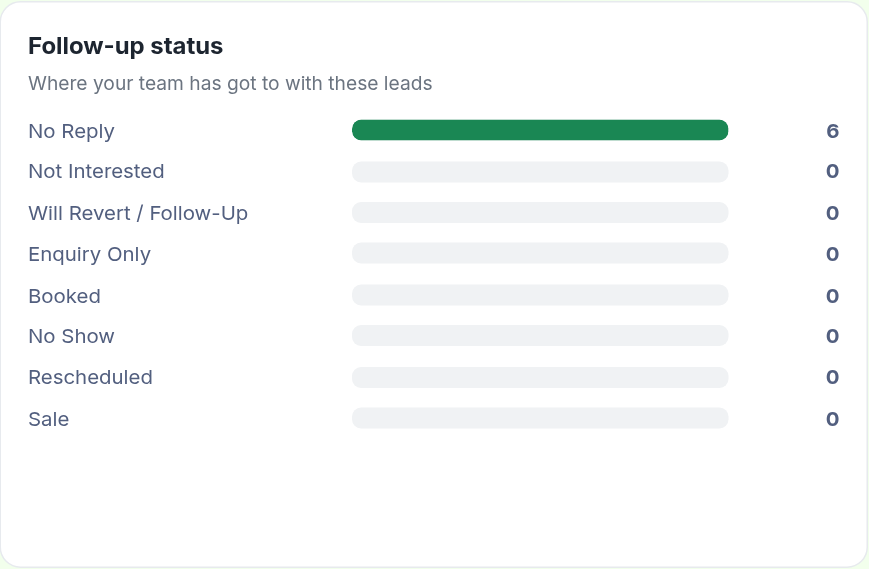
- One list, one status. Every lead, from a booking or a WhatsApp tap, has a status you control: No reply, Will revert / follow-up, Enquiry only, Booked, No show, Rescheduled, Sale. Move it as the conversation progresses and your funnel is visible at a glance.
- Start the conversation. "Start chat" on the card opens the contact so your agent can reply, or send an approved template once the 24-hour WhatsApp window has closed.
- Group-based follow-up. Because the lead is in a group, you can run follow-up campaigns or automated WhatsApp flows on that group: a reminder, an offer, a nudge after two days.
- Convert to a booking. When the lead books, set the status to Booked, or send them your Acuity link in the chat. Their history stays on the card, so you can see exactly how they arrived and what happened next.
Track everything, from the first tap
Because the keyword stays with the lead, Insights can answer the questions that matter:
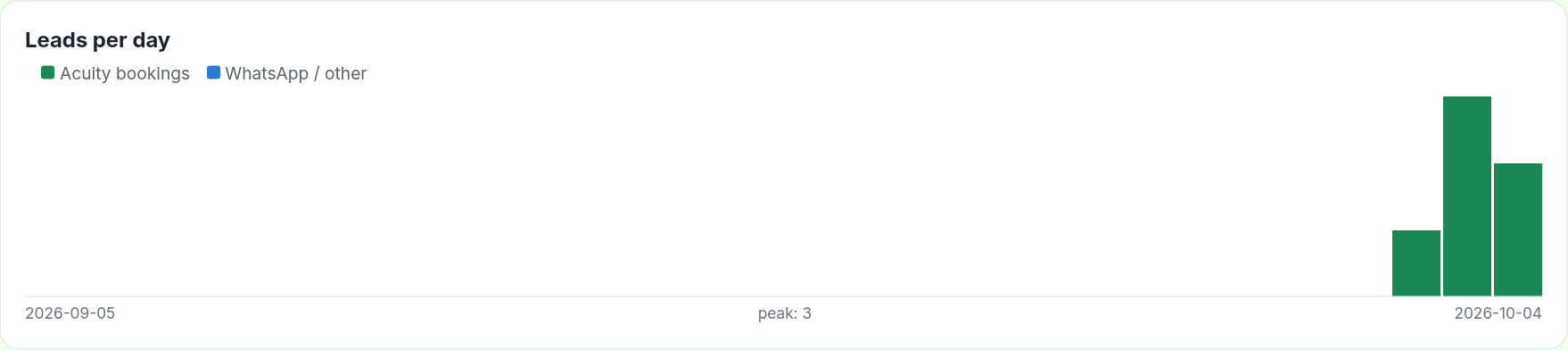
- How many leads came from WhatsApp taps versus calendar bookings?
- Which landing page or ad keyword brings the most conversations?
- Out of those, how many were booked (shown as leads and booked per keyword)?
- Which hours do WhatsApp leads arrive, so you know when to staff the inbox?
On the Appointments page, a "WhatsApp leads" counter (you can name it after your campaign or agency) shows today's taps, and a source filter separates WhatsApp leads from Acuity bookings in one click. Add your UTM parameters to the ad link and the same campaign data you capture on bookings lines up with your WhatsApp leads, so a single report covers both paths.
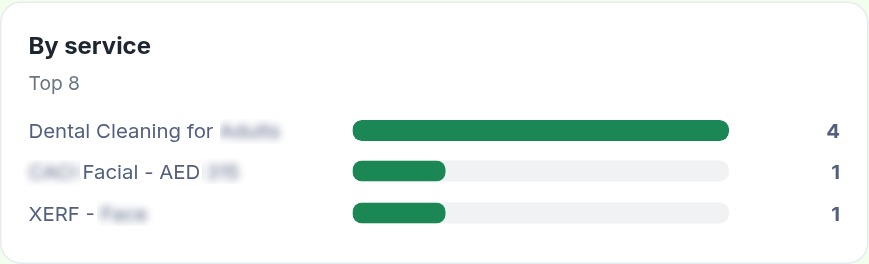
The dashboard: see where leads come from
A busy team does not need a hundred reports. It needs a few clear numbers, always current.
On your appointments page, at a glance: new leads from Acuity today, confirmed bookings today, WhatsApp leads today (you can name this counter after your campaign or agency), clients who got a welcome but have not replied, and leads and booked clients this month and last month with the booking rate.
How lead sources are tracked
Add a few hidden fields to your Acuity intake form (utm_source, utm_campaign,
utm_content, the landing page and the Facebook or Google click ID), have your landing page pass
them in, and map them in your Zap. From then on every booking carries its origin, and Insights shows
which ads bring leads: platform, campaign, ad, landing page and WhatsApp keyword, each with how many
leads were booked. Click-to-WhatsApp leads carry theirs through the keyword or reference in the pre-filled
message.
Now "our ads work" becomes "this campaign, this ad and this landing page produced these bookings."
Why this is a different category of tool
Scheduling software books the appointment. Wa Tawasul runs what happens after.
| Without Wa Tawasul | With Wa Tawasul |
|---|---|
| Staff notice bookings when they remember | Every booking is processed within minutes, day and night |
| Copy and paste phone numbers into WhatsApp | Contact created automatically |
| Branch or agent chosen by hand | Rules assign group and agent for you |
| Welcome sent late, or never | Branded template, timed to your sending hours |
| "Did they get it?" | Sent, delivered, read, failed, visible on each lead |
| Ad results are a guess | Leads and bookings by campaign, ad and landing page |
| Fake or repeat bookings waste time | Quality score and history on every lead |
The point is not to remove people from your business. It is to remove the copying, remembering and chasing, so your people spend their time on conversations that matter: answering questions, building trust, closing the sale.
Who it is for
- Clinics and dental practices with several branches and different front desks
- Salons, spas and aesthetic studios that live on bookings and no-shows
- Coaches, consultants and tutors who sell a first call
- Fitness and wellness studios running trial-class offers
- Agencies managing campaigns for appointment-based clients who need proof of results
If your business takes bookings through Acuity or Squarespace Scheduling and your clients answer on WhatsApp, this is built for you.
What a typical day looks like
- A client taps your Instagram ad, lands on your page and books a Tuesday appointment.
- Within minutes, the booking reaches Wa Tawasul. The contact is created, the client joins the right group and the right team member is assigned.
- Your branch team gets an email. The client gets a personal WhatsApp welcome at a sensible hour.
- You see the lead on your dashboard, tagged with the campaign and ad that brought them.
- If the client stays silent, your team can send one polite follow-up that afternoon.
- If they reply, the conversation moves into the shared WhatsApp inbox and your team takes over.
- At month end, you know how many leads, how many bookings and which ads delivered them.
No spreadsheet, no copy and paste, no "I forgot to message them."
Getting started
- Connect Acuity on the Setup page (private link plus Zapier, about ten minutes).
- Create your lead rules: one per location or service, plus a default.
- Pick your welcome template and sending hours.
- Add the hidden tracking fields so every booking carries its source.
- Watch the dashboard fill up.
Your first booking becomes your first automated follow-up.
The bottom line
Your calendar is full of people who said yes. The only question is what happens in the next ten minutes. With Wa Tawasul, the answer is the same every time: a fast, personal welcome, the right person assigned, the source recorded and the numbers on your screen.
Connect your Acuity or Squarespace Scheduling account to Wa Tawasul today.
watawasul.ae
Wa Tawasul is a WhatsApp Business platform provider. Message templates are subject to WhatsApp approval, and sending follows WhatsApp's opt-in rules. Screenshots are from a live account; client names and contact details are blurred.